mac-cli is a multi-purpose command-line tool for macOS, written in Odin. It consolidates three everyday utilities — disk cleaning, image and video optimisation, and screenshots — into a single small binary that is also easy for AI agents to drive. Only an Apple Silicon (arm64) build is currently published.
Source and releases live at github.com/luthebao/mac-cli.
Install
The following command installs the latest release binary and does not require the Odin toolchain:
curl -fsSL https://raw.githubusercontent.com/luthebao/mac-cli/main/install.sh | bash
The script downloads the latest tarball and installs it to /usr/local/bin when that directory is writable, or ~/.local/bin otherwise. It removes the macOS quarantine attribute so Gatekeeper does not block the first launch, and prints a PATH hint if the chosen directory is not already on $PATH.
Self-update
The binary can update itself using the same installation logic:
mac-cli update            # install latest if newer
mac-cli update --check    # report only; exits non-zero when update available
mac-cli update --force    # re-run the installer even if already current
Commands
clean — disk cleaner
mac-cli clean                        # interactive cleaner
mac-cli clean --risky                # include risky categories
mac-cli clean categories             # list all 16 cleanable categories
mac-cli clean uninstall              # remove apps + their leftovers
mac-cli clean maintenance --dns      # flush DNS cache
mac-cli clean backup --list          # list pre-delete backups
The interactive cleaner scans every category and shows exactly what will be removed, and how much space will be reclaimed, before asking for confirmation:
![mac-cli clean scanning the Mac and reporting 17.5 GB cleanable, with a summary of 205 items and a [Y/n] confirmation prompt](/assets/img/posts/mac-cli/clean-scan.png)
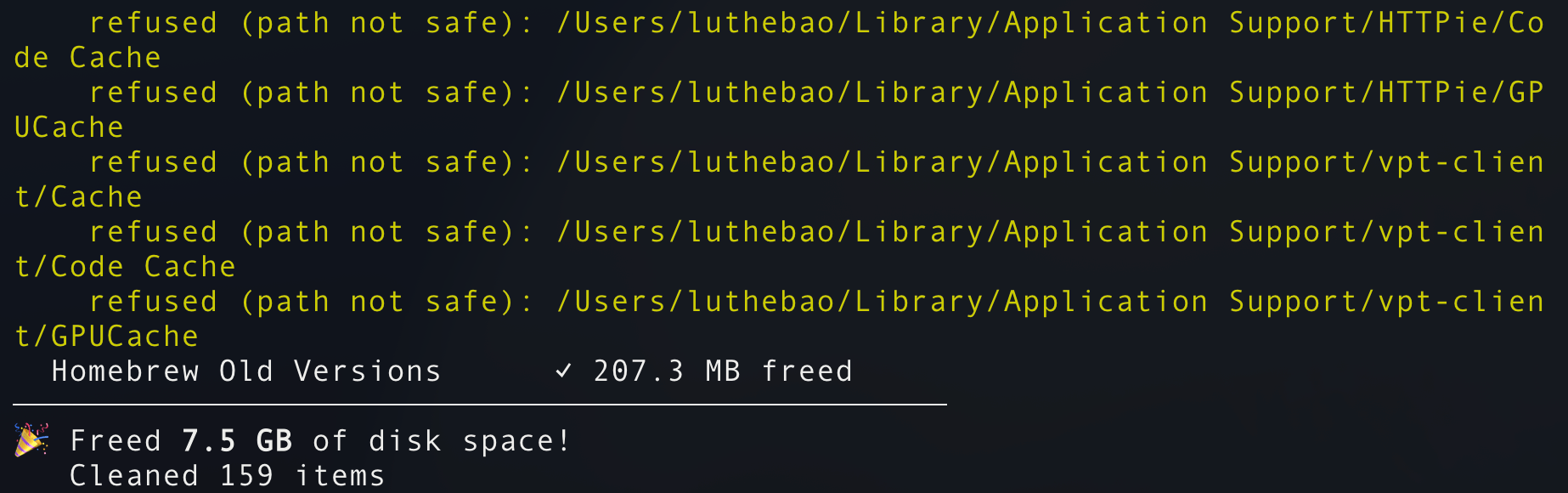
Any path outside the known-safe set is refused rather than deleted, so a faulty rule cannot affect an unintended directory. On completion, the tool reports the total space freed:
clop — image & video optimiser
mac-cli clop                         # interactive picker
mac-cli clop -o photo.png            # optimise in place
mac-cli clop -o ~/Pictures -r        # recurse into a directory
mac-cli clop -d 50% clip.mp4         # downscale by factor
mac-cli clop -c webp cover.png       # convert image format
mac-cli clop -s IMG_2156.jpg         # strip EXIF metadata
clop delegates to format-specific CLIs (pngquant, jpegoptim, gifsicle, ffmpeg, vips, cwebp, heif-enc, exiftool). If a required tool is missing, it offers an interactive brew install on first use. Supported formats are .png, .jpg, .jpeg, and .gif for images, and .mp4, .mov, and .m4v for video.
shot — screenshots
mac-cli shot                         # interactive picker (type to filter)
mac-cli shot -s                      # capture full screen
mac-cli shot -l                      # list running GUI apps with PIDs
mac-cli shot -p 1234                 # capture a specific app by PID
Screenshots are saved to ~/Desktop as PNG files. The first run may prompt for the Screen Recording permission under System Settings → Privacy.
Claude Code agent skill
For Claude Code users, a companion agent skill lets Claude operate mac-cli directly — cleaning caches, capturing app-specific screenshots, optimising media, and more:
npx skills add luthebao/mac-cli
The skill expects the mac-cli binary to be on $PATH, so install the tool first.
Build from source
git clone https://github.com/luthebao/mac-cli.git
cd mac-cli
make build                           # → build/mac-cli
make test
make install
Licensed under MIT.